Sigmafine Client
The following are the steps to restore the PI AF Clients. This is appropriate when the server crashes or a new PI-Client is installed.
- This procedure assumes the operating system was reinstalled and has no knowledge of previous installation.
- Proceed with a new installation of the Sigmafine client. See the \topic [Sigmafine Client Installation](../Installation/Sigmafine Installation/sigmafine-client-installation.md).
- Once the software is installed, open PI system Explorer. It should connect to the AF database.
Restoring an Ad hoc Backup of the Database
The following are the steps to restore the Ad hoc back up:
Open PI System Explorer.
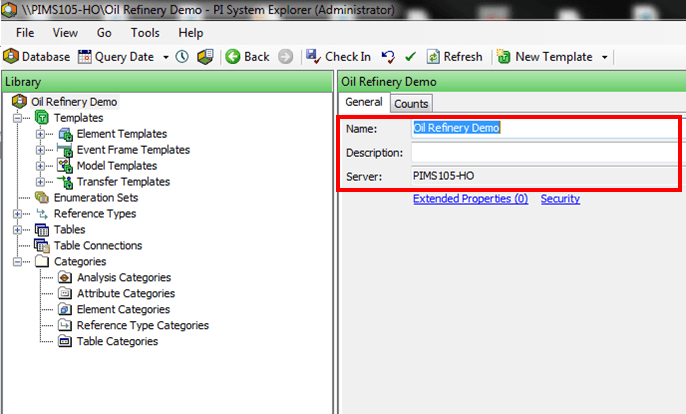
Create a new database (see example in Figure 39).
Right-click in the database name and select Import from file.
The Import from File window opens.
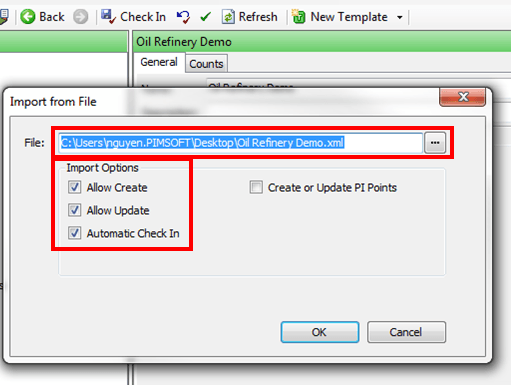
The import window provides the file name and location from last exported file.
Select the XML file to import.
After selecting a file, the OK button become enabled.
There are several import options available' Allow Create, Allow Update, Automatic Check-In and Create or Update PI Points
Select (check) all the Import Options displayed in Figure 40.
Click OK to save your selections and close the window.
Recovering the Model in ProcessBook
To recover the Model in ProcessBook:
Open ProcessBook.
Once the ProcessBook is opened, the procedure is straight forward.
Open the saved .pdi file.
Be aware that when recovering the Sigmafine Model in ProcessBook, the file might differ from the actual AF Model in the AF database.
ProcessBook prompts you to synchronize the display with the following options:
Synchronize display with AF Model
Synchronize AF Model with display
Do not synchronize
We recommend that you always synchronize.
- Synchronize using one of the following options:
- If changes to the Model were made in PI System Explorer, then it is recommended that you use Synchronize display with AF Model.
- If last changes to the Model were made in ProcessBook, then it is recommended that you use Synchronize AF Model with display.